Sew Heidi case study: matching lead magnets to visitor intent
How Successful Fashion Designer combined page context and one goal question in a centralized opt-in experience—and how to read its reported 7.8% result.

Key takeaways
- Successful Fashion Designer centralized the opt-in decision instead of maintaining separate recommendation logic across a large content library.
- Page context showed what a visitor was reading; one explicit question distinguished whether that person wanted a fashion job, freelance work, or their own brand.
- The system used those signals to select and frame a relevant lead magnet, then kept the stated goal useful beyond the form.
- The historical report shows a 7.8% opt-in rate, but the surviving snapshot does not establish a lift, a causal comparison, or a universal benchmark.
- Copy the decision model, not the percentage: map a small resource family, ask only for missing context, preserve a fallback, and measure the whole subscriber path.
The form problem was really a decision problem
The case-study record describes a familiar content-business setup: a growing article library, several lead magnets, ActiveCampaign forms, and recommendation logic distributed across individual pages. Each new resource or article created another place where copy, form behavior, and follow-up could drift.
More forms would not answer the central question: What should this visitor see next?
Topic alone was not enough. Someone reading about tech packs might be preparing a portfolio for a fashion job, improving a freelance service, or researching production for a new brand. All three people could value the same technical resource, but for different reasons. Treating a pageview as proof of the person’s larger ambition would have been a guess.
The audience answer also could not do all the work. “I want to freelance” does not reveal whether someone is reading about pricing, Adobe Illustrator, client contracts, or garment production. A generic freelance offer could still interrupt the task that brought them to the page.
Successful Fashion Designer combined the two:
- Content context narrowed the immediate subject and the pool of useful resources.
- A stated goal clarified the outcome the visitor wanted from that subject.
Centralizing that decision removed the need to make every embedded form its own miniature funnel. It also made the normal experience easier to maintain: if the available context was weak or no rule matched, the visitor could still see a sensible default rather than a forced recommendation.
How the personalized lead magnet mechanism worked
The historical implementation can be understood as a four-part decision, not as a magical form that “knew” each visitor.
- Recognize the content context. The article or content category gave RightMessage a bounded signal about the current visit. It could distinguish a reader exploring one subject from a reader exploring another without claiming to know who either person was.
- Ask for the missing intent. The experience asked whether the visitor’s goal was their own fashion brand, freelancing in fashion, or a job in fashion. Those exact categories are visible in the retained RightMessage report. The question earned its place because each answer could change the recommendation or its explanation.
- Choose and frame the resource. The content context helped choose a suitable lead magnet. The goal changed the angle. A technical template, for example, might be explained as a way to strengthen a job portfolio, deliver more professional freelance work, or reduce avoidable production mistakes for a brand. These are illustrations of the decision logic, not recovered copies of the original variations.
- Submit once and retain the answer. The form captured the email address and passed the useful goal into the subscriber workflow. RightMessage made the on-site recommendation decision; ActiveCampaign remained the contact and email system. That distinction matters because displaying a variation and storing a durable subscriber field are separate jobs.
This was not a claim that every article needs a unique download. Several pages can map to one resource. One resource can also be framed differently when its real value changes with the visitor’s goal. The test is not “Can we produce another variation?” It is “Would this context make a different recommendation or explanation more useful?”
Current RightMessage flows can combine page, campaign, prior-answer, and supported ESP/CRM context, ask the next useful question, and route a visitor to a form, resource, offer, or follow-up. That is the current product model. The complete historical rule tree for this implementation is not preserved, so it would be misleading to present this case study as a click-by-click setup guide.
What the historical 7.8% result proves—and what it does not
The retained dashboard is the strongest surviving artifact from the original implementation.
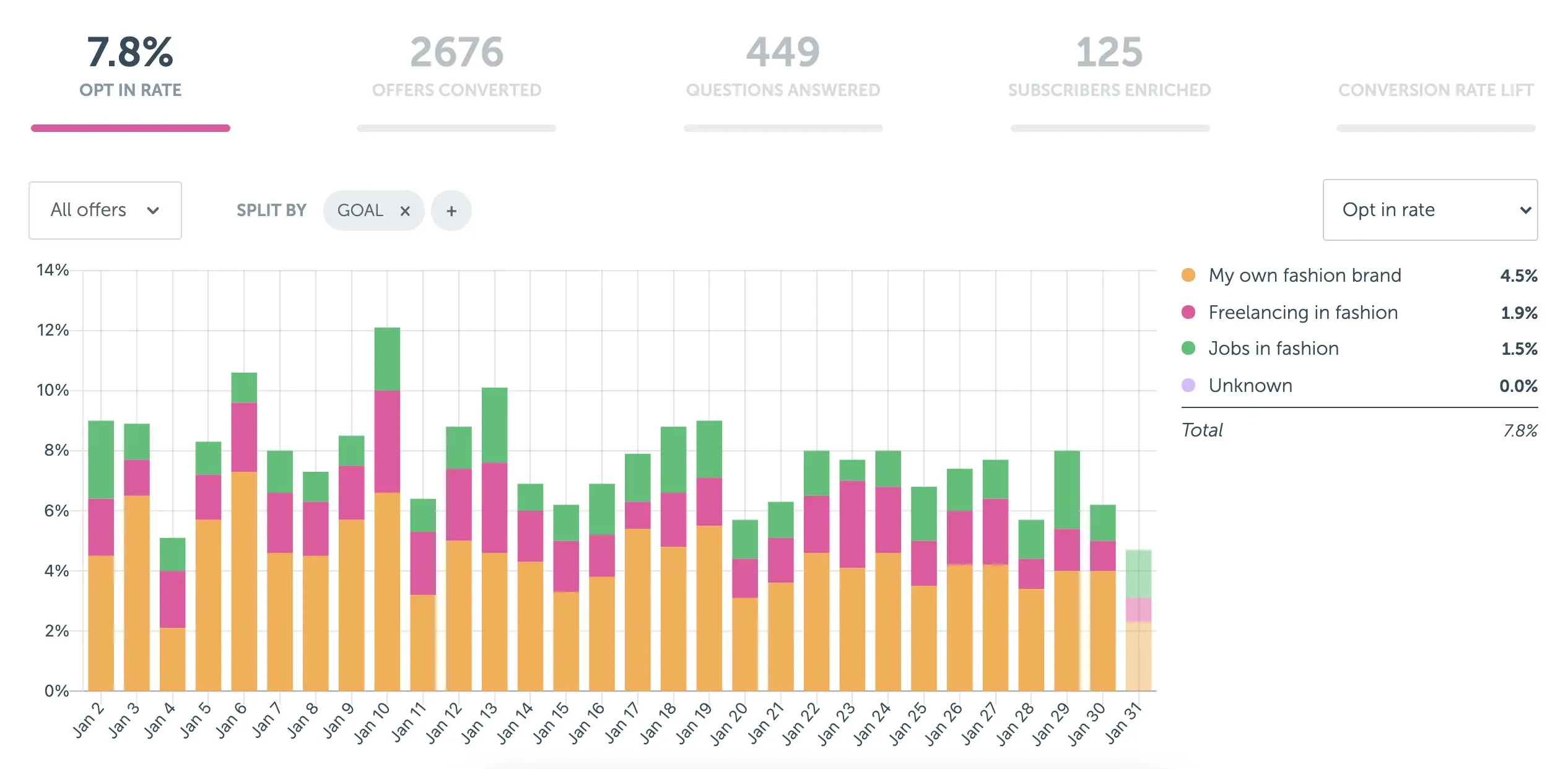
The report shows:
- a 7.8% opt-in rate;
- 2,676 offers converted during the displayed reporting view;
- opt-in contributions split across “My own fashion brand,” “Freelancing in fashion,” and “Jobs in fashion”; and
- additional counts for questions answered and subscribers enriched.
No surviving primary artifact establishes the earlier opt-in rate. The old article’s comparison is therefore excluded rather than repeated as evidence.
The screenshot does not preserve the reporting year, traffic volume, traffic-source mix, placement changes, returning-visitor rules, or a holdout group. “Offers converted,” “questions answered,” and “subscribers enriched” are also different events; they should not be added together or relabeled as monthly subscribers.
So the evidence supports a bounded conclusion: the centralized experience operated at a displayed 7.8% opt-in rate. The artifact does not isolate which part of the experience caused that rate, show the result without personalization, or predict what another site will achieve.
The fuller Sew Heidi customer story reports a later 12% overall website opt-in rate alongside a broader segmentation and onboarding system. That is a different evidence window. Keeping the two numbers separate is more useful than blending them into one success curve.
Why the goal answer mattered after signup
A personalized form can improve the moment of signup and still waste the answer immediately afterward.
In this case, the visitor’s goal was useful because it could travel with the subscriber. A job seeker, freelancer, and future brand owner should not automatically receive the same opening argument simply because they downloaded the same file. The stored answer could change which examples appeared first, which article followed, and which offer made sense later.
The field also gave the business a clearer view of its audience. Article traffic tells you which subjects attract attention. A direct answer tells you what people say they are trying to accomplish. Neither is perfect, and goals can change, but together they are more actionable than a pile of disconnected download tags.
This is where data modeling becomes practical. Use a replaceable field for one current primary goal when the answers are mutually exclusive. Use tags or events for facts that can coexist, such as downloading two different resources. The exact implementation depends on the email platform and integration. The email list segmentation guide explains that distinction in more detail.
Do not collect the goal just to decorate a contact record. Decide what each answer changes before adding the question. If all three answers receive the same email, proof, resource, and offer, the question is form friction with no visitor payoff.
What to copy from this case study
Copy the structure, not the fashion categories or the 7.8% result.
- Start with one resource family. Choose a cluster of articles that serves a recognizable problem. Do not begin by rebuilding the whole library.
- Write the decision table. For each content group, list the useful lead magnet, the context you already know, the one missing answer that could change the recommendation, and the fallback when you do not know it.
- Make each answer visible. Draft the headline, explanation, resource, or follow-up that changes for every option. Delete answer choices that lead to the same experience.
- Keep the ordinary path useful. Someone who skips the question or does not match a rule still deserves a complete, relevant signup offer.
- Measure the subscriber path. Track form exposure and opt-in rate, then look at confirmation, early email engagement, and the business outcome the recommendation is meant to improve. A higher signup rate can still attract the wrong people.
For the form itself, the newsletter signup guide covers promise, fields, follow-up, and measurement. For the site around it, website personalization can change the explanation, form, offer, or next step on pages you already have.
The first move is small: take one group of articles, one resource, and one question you will genuinely use. Map what each answer should change, keep a fallback, and compare the result with your own baseline. Then build the flow that connects the question, form, and next step.
Common questions
Frequently asked questions
What is a personalized lead magnet?+
A personalized lead magnet is a resource selected or described using relevant visitor context, such as the page being read, campaign source, or an answer the visitor provides. The ordinary offer should remain useful when that context is missing.
Which signals did Successful Fashion Designer use?+
The historical case-study record describes two inputs: the content a visitor was reading and a stated goal—getting a fashion job, freelancing in fashion, or building a fashion brand. Page context narrowed the subject; the answer supplied intent that a pageview could not establish.
Does every article need a different lead magnet?+
No. Group articles by the visitor problem they serve, then map each group to a useful resource. The same resource can sometimes work across several groups when its explanation changes to make the relevant payoff clear.
Is a 7.8% opt-in rate a good benchmark?+
It is a historical result from this implementation, not a general benchmark. Traffic source, page intent, offer, placement, returning-visitor mix, and measurement window all affect an opt-in rate. Compare your change with your own reliable baseline or control.
Where should a visitor’s stated goal be stored?+
Store a durable goal in the supported field or segment your email platform or CRM will actually use. Define the allowed values and fallback before launch, then use the answer in a visible next step rather than collecting it for its own sake.