How The Garden Room Guide turned a pricing quiz into a lead-generation calculator
After The Garden Room Guide launched a short pricing quiz that routed visitors to a more relevant answer, the team reported sharply fewer support emails and more advertiser click-through.

Key takeaways
- Start with a repeated question whose honest answer depends on a small number of inputs.
- A lead-generation calculator can be a guided decision tree; it does not need to manufacture one exact price.
- Make every result lead somewhere useful, then keep the answers available for the next page or follow-up.
- Measure self-service, referral action, and downstream outcomes separately instead of treating quiz completion as success.
The inbox was doing work the website could do
The Garden Room Guide was built to help people research a purchase with lots of variables. Size matters, but so do construction type, specification, intended use, and the property itself. The publisher’s current explanation of garden-room pricing still makes that variability plain: prices change with the room and with what a supplier includes.
Before the guided calculator launched, the team reported receiving 146 price-related emails in four weeks. A prepared answer might make each reply faster, but someone still had to read the question, work out which context was missing, choose a useful response, and send it. Then the next visitor arrived with a version of the same question.
That is a good candidate for self-service. Not because every support email should be deflected, but because the first part of the conversation was predictable:
- Identify the few details that materially change the answer.
- Explain what can be estimated and what still depends on a supplier.
- Give the visitor a useful result now.
- Offer a human or commercial next step when the result earns it.
The goal was not to put a form in front of help. It was to give visitors a faster answer while preserving the signals that showed what they needed.
The “calculator” was really a guided route
A lead-generation calculator does not have to be a spreadsheet with a currency symbol at the end. When the underlying purchase is variable, the honest output may be a price range, a comparison, a recommended resource, or the right provider to contact next.
The historical Garden Room Guide experience began with a consequential split: was the visitor considering a modular design or something more bespoke? That question changed which information would be relevant next. It also avoided pretending that two different buying paths could be summarized by one universal figure.
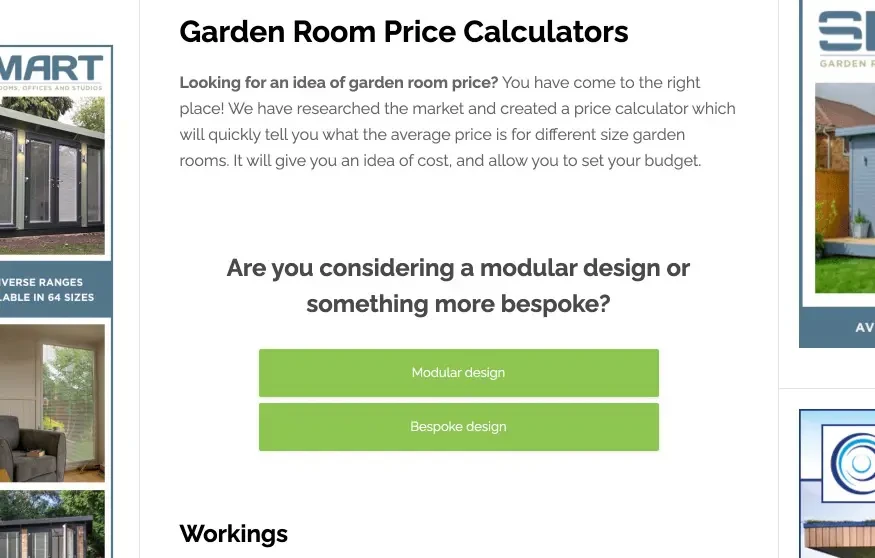
This is the important distinction between a useful calculator and a lead form wearing a calculator costume. A useful calculator gives value before asking the visitor to take a commercial action. Each question narrows the answer. Each branch removes irrelevant information. The result explains what the visitor can reasonably conclude and where uncertainty remains.
The Garden Room Guide’s live site continues to offer a market-researched price calculator that separates estimates by size and construction specification and states what is included or excluded. It shows that visitors still need help making sense of a variable price. But it is not the historical RightMessage implementation covered in this case study.
How the routed result led to an advertiser click
The referral action did not happen when someone clicked the last answer. It happened when the routed result helped a visitor take a more informed next step.
The mechanism had four parts:
- A high-intent question opened the flow. Someone looking for a price was already closer to a buying decision than a casual article reader.
- The answers created context. The visitor’s project type and other selections narrowed what would be useful.
- The result matched that context. Instead of handing everyone the same generic page, the experience could route the visitor to a relevant resource or lead magnet.
- The next action created a handoff. After seeing the routed result, a visitor could click through to an advertiser, while the answer data remained available for later email follow-up and on-site calls to action.
That last part is what makes this a lead-generation calculator rather than a standalone content widget. The calculator did not merely entertain or collect data. It gave the visitor a useful result, then made an advertiser click possible afterward.
It also made the next visit smarter. If someone had already said they wanted a bespoke project, the site did not need to keep treating them like an unknown reader. Their answer could shape later proof, content, or calls to action. The exact fields and integrations depend on the setup, but the operating rule is stable: if you ask a question, decide where the answer will be stored and what will visibly change because of it.
The same rule applies after an opt-in. Our guide to using a thank-you page survey shows how to connect one answer to a specific follow-up rather than collecting audience trivia.
What the team reported—and what the numbers mean
The Garden Room Guide compared the period before the calculator with the period after it launched and reported three changes:
| Reported measure | Before/after observation | What it suggests |
|---|---|---|
| Price-related emails | 146 emails in the four weeks before launch; 13 in a comparable four-week period after launch | More visitors could answer the repeated pricing question without contacting the team. |
| Advertiser click-through | Up 19.16% in the month after launch | More visitors took the referral action that mattered to the publisher. |
| Time on site | Up 11.81% in the month after launch | Visitors spent longer with the experience, though time alone does not prove better intent or revenue. |
The support change is the most concrete operational result: 133 fewer price-related emails across the two reported periods, a reduction of about 91%. It should still be read as the team’s comparison, not a guarantee for another site.
The advertiser click-through figure is commercially interesting because it measures the handoff that followed the routed result. But it is not the same as a completed inquiry, booked project, or advertiser revenue. A strong measurement plan would follow the referral further and separate calculator users from visitors who did not use it.
The time-on-site increase is supporting context, not the headline. Longer visits can mean engagement, confusion, or simply a longer flow. The better question is whether visitors found an answer and reached the next action with less friction.
Traffic mix, seasonality, other site changes, and differences between the comparison periods could all affect these numbers. The case supports testing the pattern; it does not establish a universal lift.
Apply the pattern to your repeated pre-sales question
Start with the inbox, sales calls, or chat log—not with a quiz template. Look for a question your team answers repeatedly where the honest response begins, “It depends.” Pricing is one example. “Which plan fits us?”, “Which service should I choose?”, and “Where should I start?” can work too.
Then build the smallest useful route:
- Define the result. Decide whether you can give an estimate, range, recommendation, comparison, or qualified handoff.
- List the inputs that change it. Keep only questions that alter the result, branch, or next action.
- State the boundary. Explain assumptions and what still requires a person, quote, or site-specific review.
- Map each route. Give every answer combination a useful resource, offer, provider, or human handoff. Preserve a complete fallback for visitors who skip.
- Keep the answer useful. Store a stable value where your later page, CTA, email, or supported ESP/CRM workflow can use it.
- Measure the whole path. Track exposure, start, completion, result views, referral clicks, qualified inquiries, downstream conversion, and repeated support questions per relevant visitor.
Do not hide a generic contact form behind six questions and call it personalization. The visitor should get a better answer because they participated. And do not force an estimate when the evidence only supports a range. A clear “here is what we know, here is what changes the price, and here is who can confirm it” is more credible than fake precision.
RightMessage’s quiz funnel builder is designed for this ask-and-route pattern: questions, conditional branches, forms, offers, redirects, and later personalization can live in one flow. Start with the repeated question that already costs your team time, give the visitor a result worth answering for, and connect it to the next action your business can actually measure.
Common questions
Frequently asked questions
What is the difference between a lead-generation calculator and a quiz?+
A calculator promises an estimate or recommendation, while a quiz usually promises a category, score, or result. Underneath, both can ask questions and branch on the answers. The label should match what the visitor expects to receive, not the software used to build it.
How can a pricing calculator generate leads or referrals?+
After narrowing the visitor’s situation, the result can give an estimate, resource, or recommendation, then invite the visitor to continue to a provider, service, or conversation. If the referral itself is matched to an answer, that match needs its own configuration and evidence. Track the click or handoff separately from calculator completion.
What questions should a lead-generation calculator ask?+
Ask only for inputs that materially change the answer or route. For a variable purchase, that might be intended use, project type, size, budget range, location, or timing. Remove any question whose answers all produce the same result.
Does every pricing calculator need to show an exact price?+
No. When the honest answer depends on a site survey, specification, or supplier, give a bounded estimate, explain the assumptions, and route the visitor to the next step needed for a firm quote. False precision is less useful than a clear range with sensible caveats.
How should you measure whether self-service reduces support work?+
Compare the rate of repeated questions per relevant visitor before and after launch, not only the raw email count. Also watch calculator starts, completions, referral clicks, qualified inquiries, and downstream outcomes while accounting for traffic, seasonality, and other site changes.