RightMessage Edge: personalization without the flicker
The benefits of server-side personalization... without needing RightMessage to replace your backend server.

Key takeaways
- Client-side personalization and A/B testing tools cause a flash of original content: visitors see your default copy for a few hundred milliseconds before the script swaps it.
- Hiding the page or the personalized elements until the script runs only covers up the flash, and hiding elements means adding code to your CMS.
- RightMessage Edge uses a Cloudflare Worker to personalize supported campaigns before the page reaches the browser, so visitors see the right content immediately. Campaigns with an A/B test need an Edge release that isn’t published yet.
- Segments that come from your email platform or CRM are cached after the first page view, so the Worker can personalize on every page view after that.
- It works if Cloudflare manages your domain, costs $5 a month on Cloudflare’s Workers Paid plan, and the code is open source under the MIT license.
The (ugly) way to fix The Flash
The usual workaround has been to hide either the entire page or the content being personalized until the script doing the personalization or split testing loads. This is how most of our competitors handle it, and it's what we've recommended since we first introduced our personalization product in 2018.
This has two big drawbacks:
- If you hide the entire page, visitors are stuck staring at a blank page until the script loads and runs.
- If you hide just the elements you're personalizing, you need to add a custom CSS class to those elements. That has to be done in your CMS or on your server, which sort of defeats the whole "use our editor to personalize your site's content, no code updates required!" goal.
We wanted to find a better way to do this. And we had pretty strict requirements:
- It had to be "one and done", like adding our JavaScript to a site's header once.
- It had to be really, really fast.
- Visitors should have zero idea that any content is being changed for them.
Introducing: RightMessage Edge
We use Cloudflare at RightMessage for everything from serving each customer's compiled JavaScript snippet to hosting our marketing website and managing our DNS. They're a great platform, and it's no surprise that so many companies are switching to them to manage their web stack.
Cloudflare has a product called Workers, which lets you modify a page before the visitor's browser gets it. This work happens on the edge, between your server and the browser.
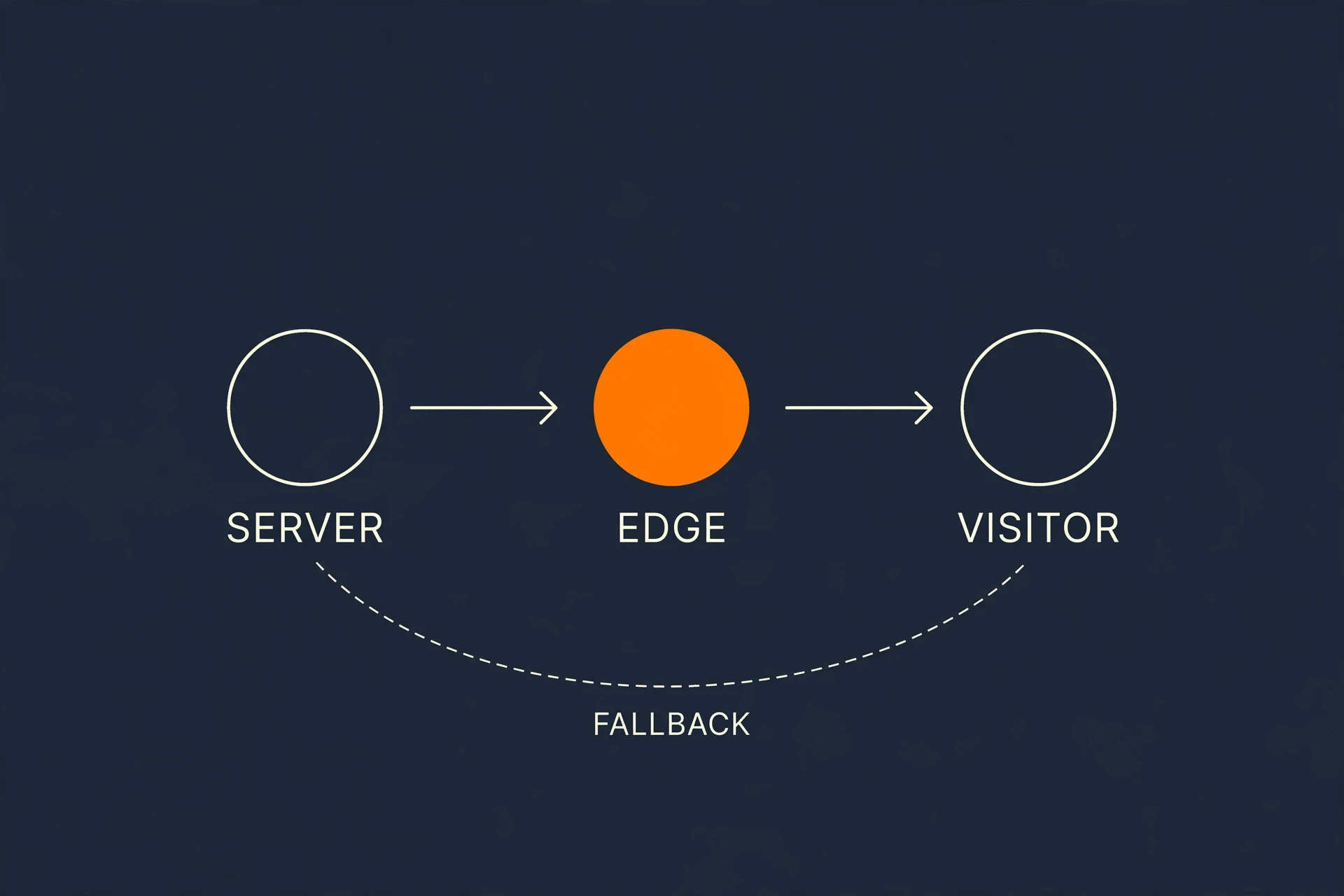
By combining a Cloudflare Worker with our new open-source edge package, RightMessage customers can now deliver flicker-free personalization for supported campaigns.
/Note on A/B tests: campaigns running an A/B test render at the edge with version 0.3.0 or later of the Cloudflare and Next.js adapters. Earlier versions leave a tested campaign to the browser script, so if you haven't updated yet, add the rmcloak class to tested elements so visitors don’t see the original first./
Here's how this works:
- When you publish changes in RightMessage, any personalization campaigns and rules you've defined get packaged up in a way that your Worker can quickly parse.
- Whenever a page loads on your site, your Worker references that package and checks whether the current visitor (and the URL they're visiting, query string parameters, and so on) matches any of your personalization campaigns.
- When matched, the Worker will transform the content before it's sent to the visitor's browser.
We decided not to add the latency (and, frankly, risk) of looking up contact data from a connected email platform or CRM in the Worker. The page itself would be held up waiting on your email platform or CRM, which is a horrible idea.
However, once the first page loads, the regular RightMessage script looks up the visitor in your CRM, and the segments your visitors match into get cached in a cookie the Worker can read. This way, on later page views, the Worker can personalize using your CRM-based segments too.
It's pretty magical when you see it in action.
When you move around the RightMessage website now, content specific to your business type shows up immediately with zero delay. It really does make it seem like our site was made for SaaS companies (assuming, of course, that you told us you're a SaaS company!)
How to set this up
Note: This only works if Cloudflare manages your domain. There's no way to run a Cloudflare Worker in front of your site otherwise.
- Head over to the edge-cloudflare repo on GitHub and click the "Deploy to Cloudflare" button.
- Set your RightMessage project ID and a route that covers your site, like
example.com/*. - Keep the normal RightMessage script on your pages.
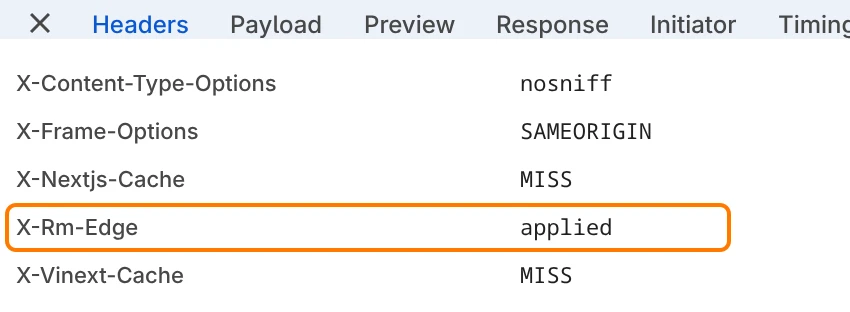
You’ll need Cloudflare’s Workers Paid plan, which is $5 a month. To check that it’s working, look for an x-rm-edge: applied response header in your browser’s developer tools.
If your website is built with Next.js: install @rightmessage/next and follow the README. One limit: Next.js and Vercel middleware can’t rewrite the page, so campaigns built in our visual editor still apply in the browser unless Cloudflare sits in front of your site.
It’s open source
The code between your visitors and your page shouldn’t be a black box, so we published it under the MIT license: the core engine, the Cloudflare Worker, and the Next.js package. rightmessage.com runs on the same code. Issues and pull requests are welcome, and security reports can be sent to hello@rightmessage.com.
Already a customer? Once you've set up the above, all you need to do is republish your project. New to RightMessage? Start a trial and see what personalizing your site looks like without the flicker (for A/B-tested campaigns, with rmcloak until the next Edge release).
Common questions
Frequently asked questions
What is the flash of original content?+
It’s the moment a visitor sees your original content before a personalization or testing script replaces it. It happens because the script can only run after the browser has started showing the page.
Does RightMessage Edge slow my site down?+
Barely. On our homepage, personalized pages start arriving in about 70–120 milliseconds, compared with 55–105 milliseconds for an unpersonalized page.
What happens if the Worker can’t personalize a page in time?+
Visitors get your normal page. If anything is missing or takes longer than 300 milliseconds, the Worker sends the page unchanged and the regular RightMessage script personalizes it in the browser, the way it always has.
Do I need Cloudflare to use RightMessage Edge?+
Yes. Cloudflare has to manage your domain so the Worker can sit in front of your site. Next.js sites can make server-side decisions with our package instead, but campaigns built in our visual editor still apply in the browser unless Cloudflare is in front.
Is my visitors’ CRM data stored in a cookie?+
No. Only the segments a visitor matches into are cached, not the data behind them. The cookie is first-party, tied to that contact and your project, and expires after 30 days.