
Protect forms from bots with Cloudflare Turnstile
What is Cloudflare Turnstile?
Cloudflare Turnstile is a modern alternative to Google reCAPTCHA that protects your forms and flows from bots without forcing people to click all the pictures with buses. It uses invisible challenges that work in the background—most legitimate visitors won't see anything at all.
When someone submits a form or quiz, Turnstile verifies they're human. If it detects suspicious behavior, it shows a simple checkbox ("I'm not a robot") or a quick challenge. Once verified, the lead syncs to your email platform as usual.
Turnstile is free for all sites and respects visitor privacy—unlike reCAPTCHA, it doesn't track users across the web.
How it works when enabled
When you enable Cloudflare Turnstile in your project settings:
A visitor fills out your form or completes a quiz
They click the submit button
Turnstile runs an invisible verification in the background
If the visitor looks legitimate, the form submits immediately (2-5 seconds)
If Turnstile detects bot-like behavior, a modal appears with a checkbox or simple challenge
Once the visitor completes the verification, the lead syncs to your email platform
Most legitimate visitors won't see any challenge at all. Turnstile uses behavioral analysis to verify humans invisibly—only suspicious activity triggers the visible checkbox.
Setting up Cloudflare Turnstile
Get your Cloudflare keys
You'll need a free Cloudflare account to generate your site and secret keys:
Go to the Cloudflare dashboard and create a free account if you don't have one
Navigate to Turnstile in your account menu
Create a new site and add your website domain
Copy your Site Key (starts with "1x") and Secret Key (starts with "0x")
Add keys to RightMessage
In RightMessage, go to Project Settings
Click the Settings tab
Scroll to the Bot Protection section
Paste your Cloudflare Turnstile Site Key in the first field
Paste your Cloudflare Turnstile Secret Key in the second field (this is encrypted and only used for server validation)
Your keys auto-save after you paste them
Click the publish button to apply the changes to your live site
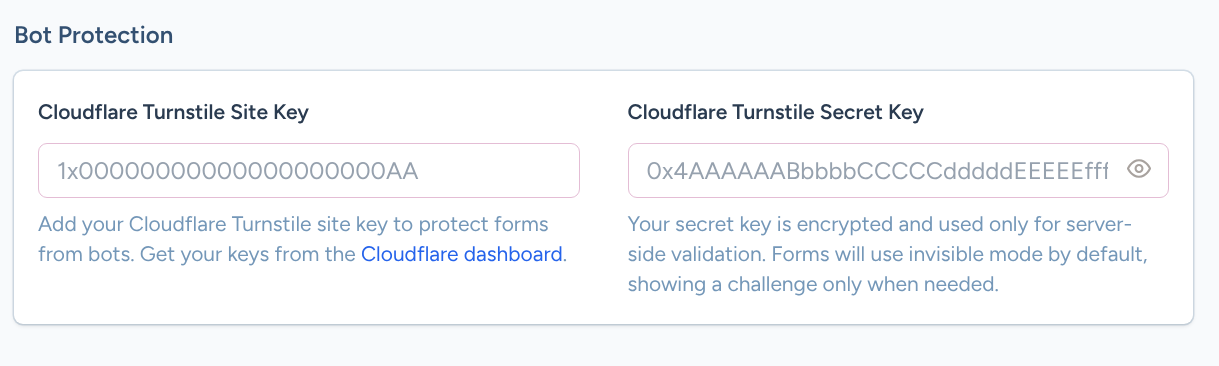
After adding your keys, you must publish your changes for Turnstile to start protecting your forms. Test by submitting a form on your live site.
What visitors experience
Low-risk visitors (most people)
The form submits normally with no visible challenge. Turnstile verifies them in the background using signals like browser behavior and device reputation.
Suspicious activity detected
If Turnstile suspects bot activity, a centered modal appears with:
A checkbox labeled "I'm not a robot" (most common)
Or occasionally a simple puzzle to solve
Once completed, the form submits and the lead syncs to your email platform immediately.
After verification: lead syncing
When Turnstile verification passes, RightMessage processes the lead submission normally:
Creates or updates the contact in your connected email platform
Applies tags, adds to lists, and sets custom fields as configured in your form
Shows the success message or redirects to your thank-you page
Turnstile verification happens server-side, so bot submissions are blocked before they ever reach your email platform or create fake contacts.
Troubleshooting
Changes aren't applying
Make sure you clicked the publish button after adding your keys. The settings auto-save, but publishing pushes the changes to your live site.
Forms still submitting spam
Check that you pasted both keys correctly (site key starts with "1x", secret key starts with "0x"). Invalid keys will cause Turnstile to skip verification.
Visitors seeing challenges too often
This is controlled by Cloudflare's sensitivity settings, not RightMessage. You can adjust the security level in your Cloudflare Turnstile dashboard.
Form submission fails after completing challenge
This usually means an unrelated integration issue (like an API rate limit with your email platform). Check your integration settings and recent activity logs.
Turnstile works with all platforms where you've embedded the RightMessage tracking script—WordPress, Webflow, Shopify, and custom sites.